
Introducing Inbox Insights, a simple yet powerful way to monitor your support performance you can access by hitting G then R, your command palette ⌘+K or via the menu on the bottom left.
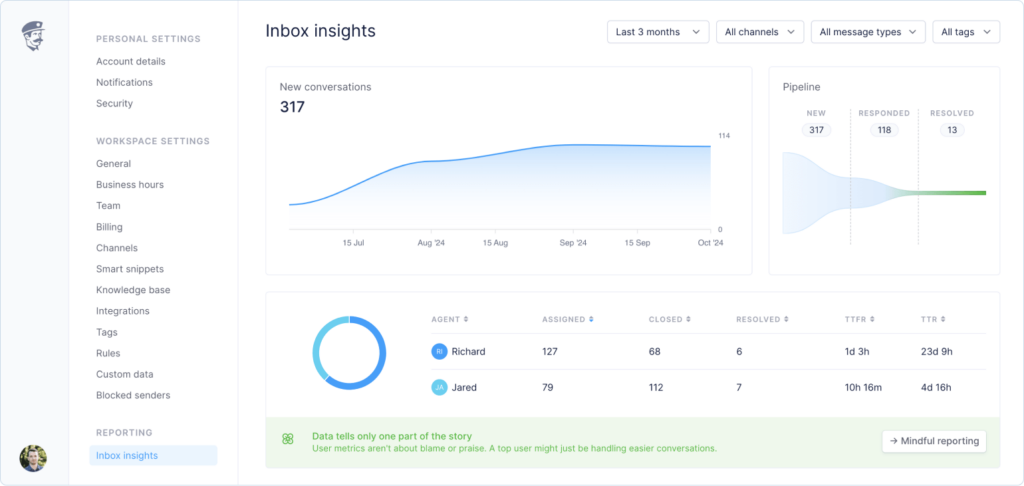
We’ve built inbox insights with context in mind, not just raw numbers.
- Conversation pipeline
Track new, responded, and resolved conversations at a glance - Team activity
See assigned conversations and closure rates for each team member - Smart filters
Break down your data by time period, channels, message types, and tags - Response metrics
Monitor median first response time and resolution time - Conversation status
Clear breakdown of open, closed, and resolved conversations
Mindful reporting
Numbers never tell the whole story – that’s why we built Inbox Insights with context at its core. The dashboard reminds you that a top performer might simply be handling easier conversations, while someone with fewer resolved tickets could be tackling the most complex problems or mentoring new team members.
We’ve deliberately designed the interface to emphasize patterns and trends over individual metrics. Each data point comes with contextual information, helping your team understand the broader picture of your support operations. This approach fosters a culture of continuous improvement rather than competition, encouraging teams to learn and grow together.