Slack Connect is great for building relationships. It's terrible for support. Messages go unread, there's no way to assign ownership, no triage, and no history. Important requests get buried in threads and fall through the cracks.
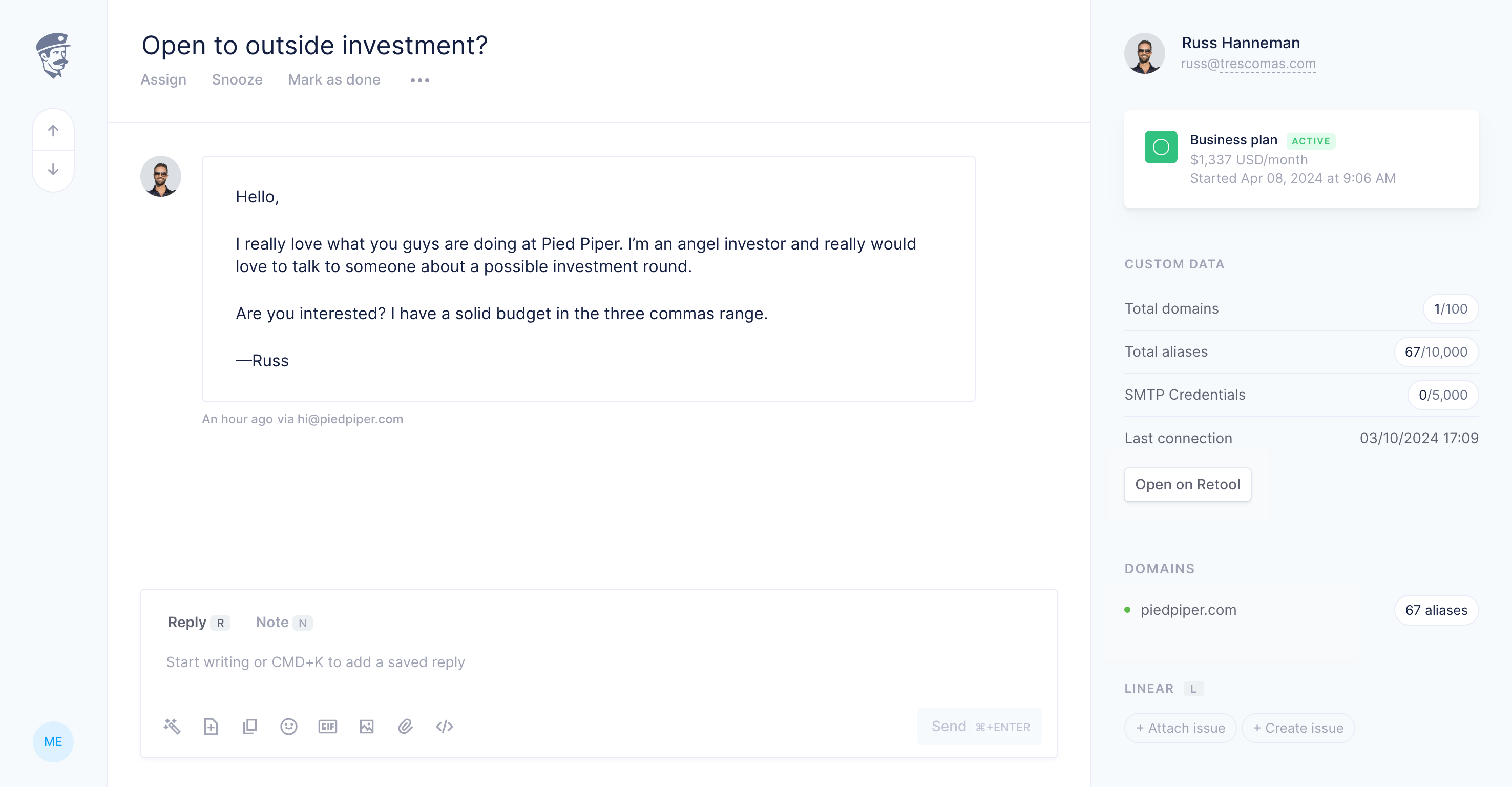
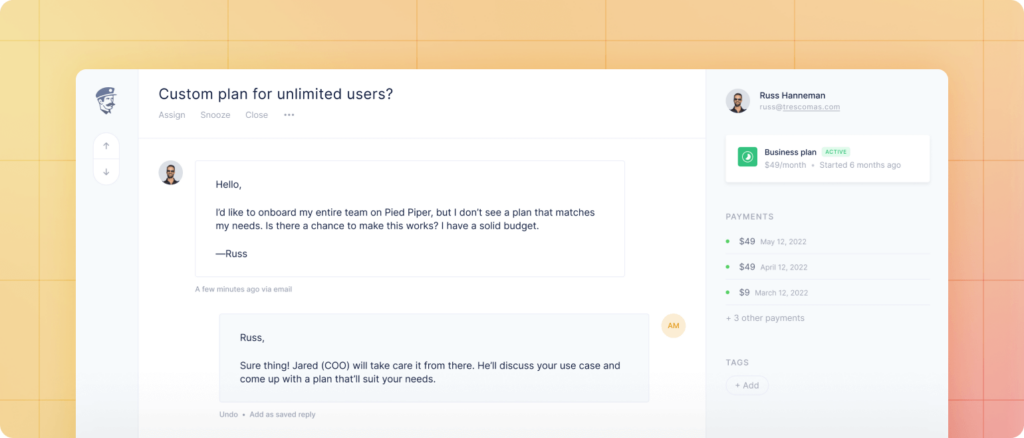
Fernand now brings structure to your Slack Connect channels. Every message from a customer Slack channel lands in your shared inbox as a proper conversation, right alongside your emails and live chats. Your whole team sees it, can claim it, and can act on it.
Nothing changes for your customers. They keep talking to you on Slack. On your end, you get assignment, AI-assisted replies, rules, internal notes, and full conversation history, exactly as you would for any other channel.
Slack Connect channels sync automatically to your Fernand inbox
Conversations are assignable, taggable, and closeable like any other
AI smart replies and drafts work on Slack threads too
Internal notes let your team discuss without the customer seeing
Rules and automations apply: route by channel, keyword, or sender
Full context sidebar: customer data, conversation history, custom data
Connect your workspace from Settings → Integrations → Slack, and pick the channels you want to monitor from Settings → Channel → Slack.
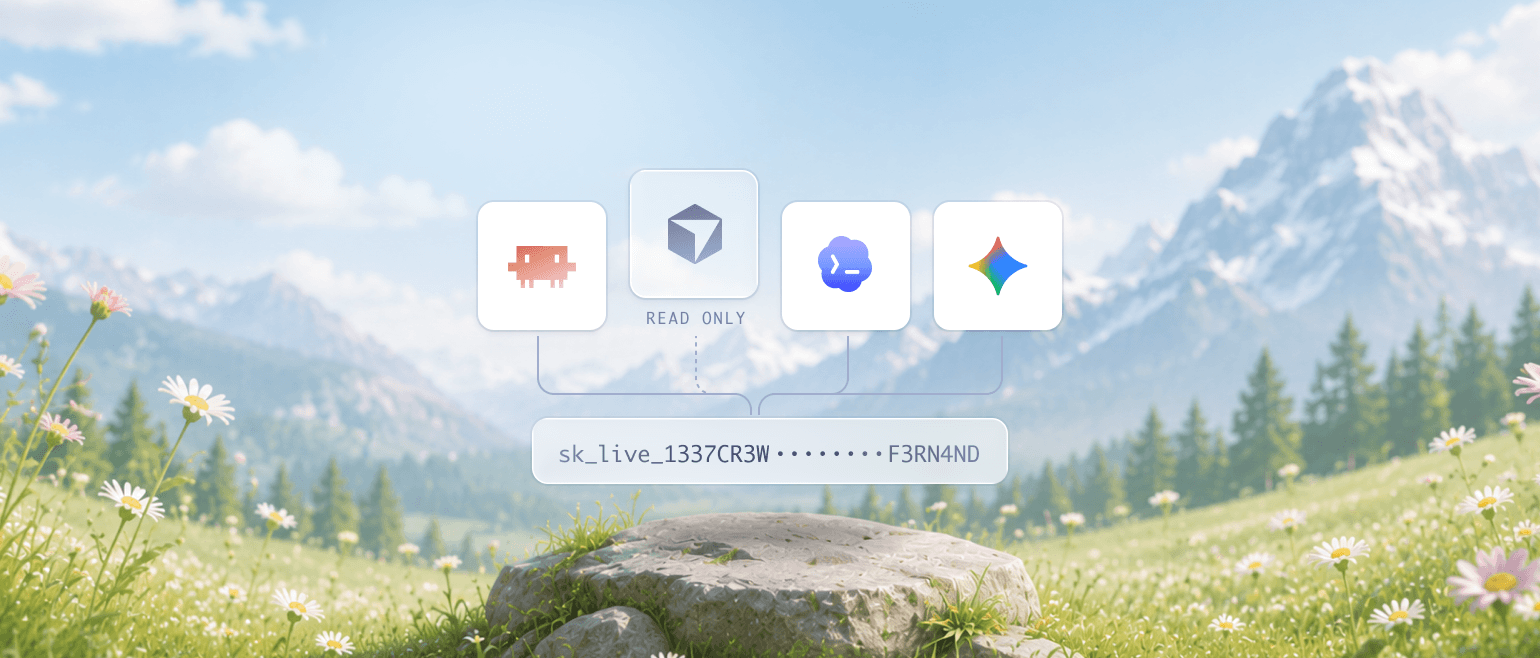
Until now, a Fernand API key was all-or-nothing: whoever held it could do everything your account could. That's fine for a trusted backend script, but it's the wrong shape for the world we're now living in, one where you hand credentials to coding agents and AI assistants that act on your behalf.
So we rebuilt API keys around permissions. Every key you create now carries its own set of scopes, so you decide exactly what it can and can't do.
Read-only keys so an agent can pull conversations, articles, and analytics without ever writing a thing
Single-purpose keys that grant only the actions a job needs, like responding to conversations or updating knowledge base content, and nothing else
Resource-scoped keys that limit a key to one or multiple specific permissions so its reach stops where you want it to
This is exactly what you want when working with Claude Code, Codex, Cursor, Cowork, and other AI agents. Spin up a read-only key to let an agent explore your data safely, or a tightly-scoped key so it can automate one workflow without touching anything else. If a key ever leaks, the blast radius is whatever you scoped it to, and you can revoke it in one click.
Dial each key to what it needs. Create your first scoped key from Settings, Integrations, API keys.
Fernand's AI already knows your product. It draws on your knowledge base and past conversations to write grounded, relevant answers. What you couldn't shape, until now, were the instructions behind it: the tone, the format, and how it approaches each task.
AI Instructions changes that. From a single page in your settings, you can fine-tune every instruction the AI follows, so each reply, draft, summary, and help article matches how you work.
Instructions are grouped by where the AI shows up, so they're easy to find and tweak:
Support widget — shape how your Messenger AI agent answers customers in live chat
Composer — tune Smart Reply, AI Draft, and AI Summaries for your agents
Knowledge base — control how articles, titles, and meta-descriptions get generated
Every instruction supports variables like ${contact_name} or ${agent_firstname}, so the AI can pull in real context as it writes. Add your brand voice, your product knowledge, and your own if-this-then-that rules.
Fine-tune your AI from Settings → AI Instructions. Included on every plan, at no extra cost.
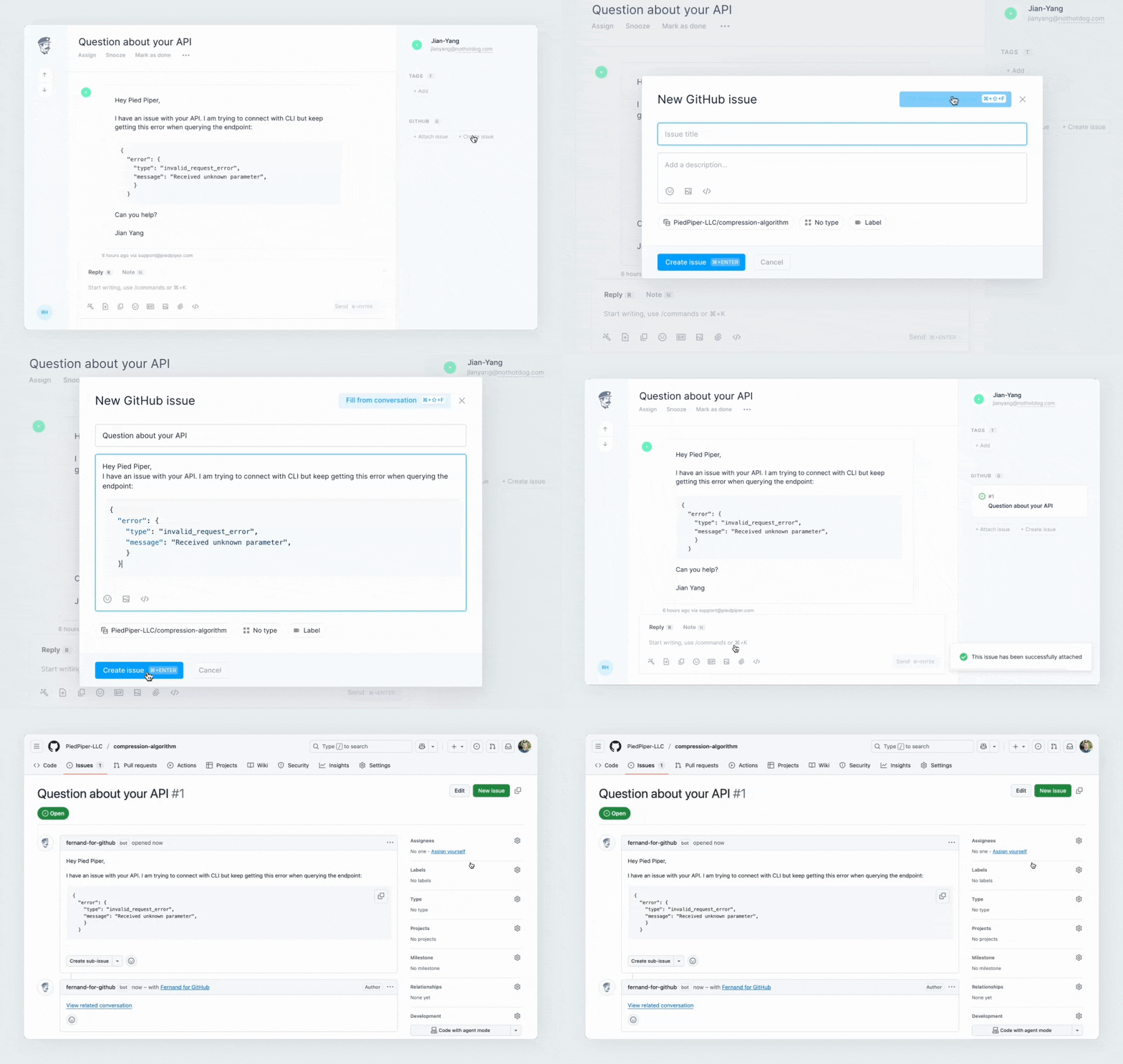
We’re delighted to release our GitHub integration to all users today. You can activate it by visiting Settings (hit G then S) → Integrations → GitHub.
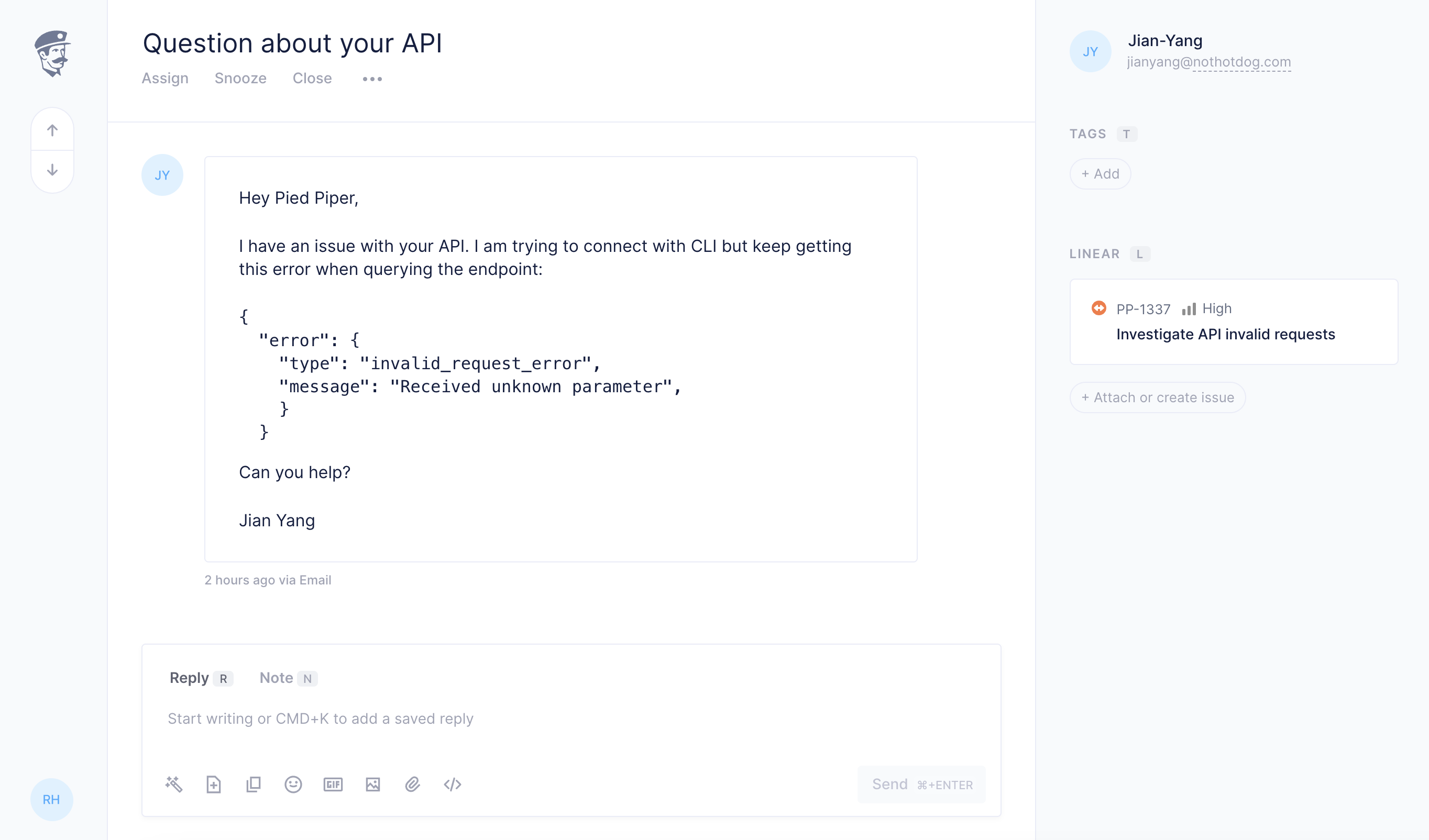
Just like our Linear integration, this GitHub integration creates a tight feedback loop between support and product. From any Fernand conversation, you can:
Create a GitHub issue without leaving the inbox
Link a conversation to an existing GitHub issue
Automatically re-open conversations when you change the status of an issue on GitHub and close the loop with your customers
Keep customer context close to engineering, and engineering status close to support
We’ve carefully mirrored most of the GitHub issue fields so you keep the same level of control from Fernand. All keyboard-first, all fast.
This release also includes close to 200 minor bug fixes, edge cases and performance improvements across the product:
Cleaner AI drafts, with no more extra line breaks when the AI writes replies
Images sent via the widget now render correctly in the support inbox without needing a refresh
You can search across all KB articles, and link articles inside other articles for cleaner docs
More control and customization on the widget home
Generate a KB article from any conversation using AI, then refine it directly in the editor
Overall reliability: many fixes around translations, tags, timestamps, mobile refresh, and chat widget edge cases
Calm, fast, integrated with GitHub, and a bit more polished everywhere.
We’re thrilled to introduce the Fernand × Polar integration — now you can seamlessly connect your Polar account and access customer, payment, and product subscription data right inside Fernand.
What it does
See payer status instantly Instantly verify if someone is an active customer, including paid plan tier, subscription details, and product purchase history — all directly in the conversation list and sidebar
Prioritize support flow Tag or route conversations based on Polar metadata — like highlighting high-tier plan users or automatically labeling paying users
Refund or cancel subscriptions natively Directly from the context of Fernand conversation thread with your customer. No need to jump between tabs to take action
Automate with data Build custom inbox rules using Polar conditions. Trigger actions like auto-replies, specific agent assignments, tags, or even webhooks based on customer subscription status
How to connect
Go to Settings → Integrations (or press G, then S in Fernand).
Click Connect Polar
Authorize via the Polar OAuth flow.
Once approved, Fernand will begin syncing customer and subscription data automatically
This integration brings all your monetization insights into Fernand. No more tab switching, no more guesswork. If you use Polar to power your product, this one is for you. For more instructions and ideas on how to use this best, check out the guide on Polar’s documentation.
Additionally, we’ve also shipped several improvements
Fernand now includes two new AI features that help you reply faster, stay consistent, and keep full control of your support experience.
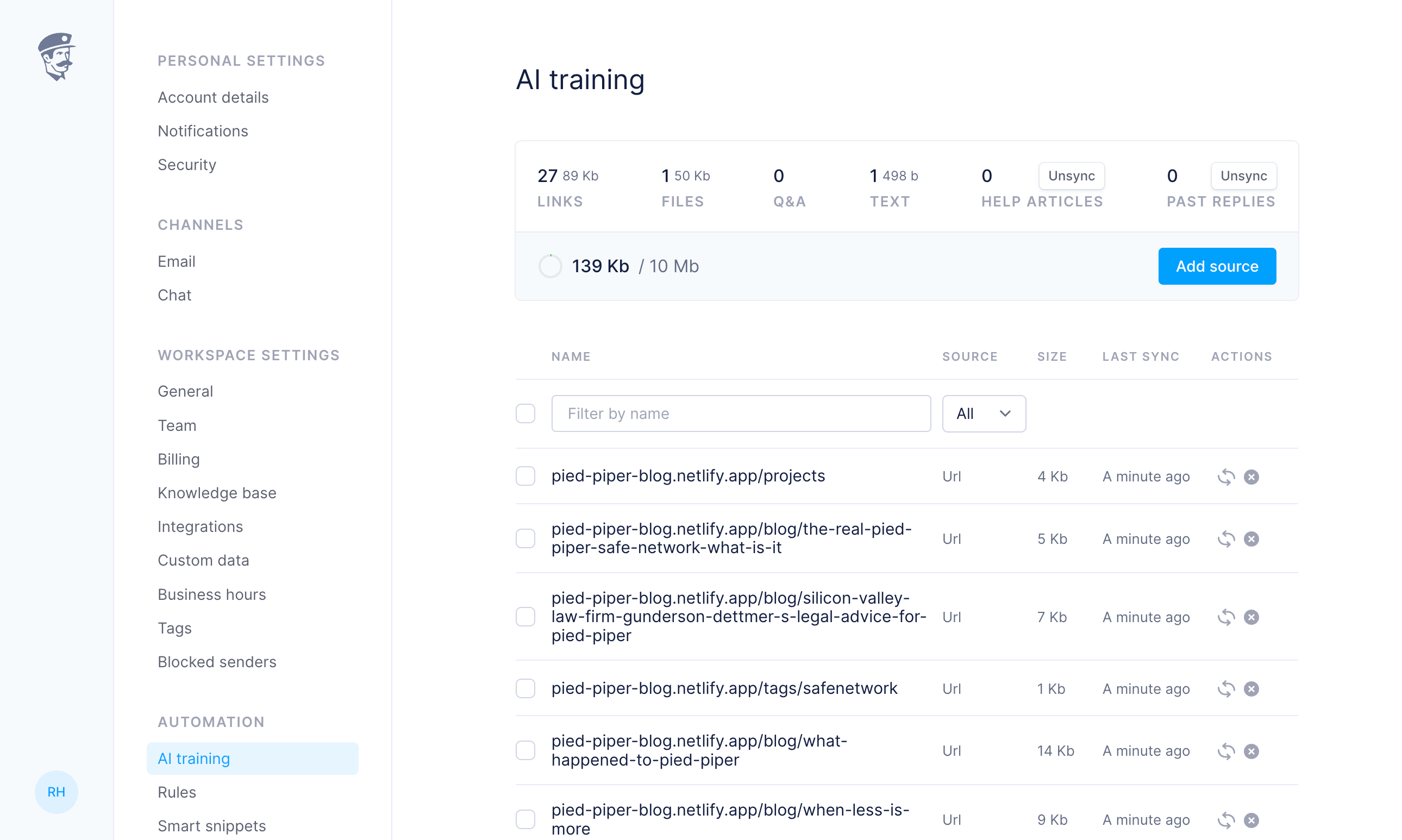
AI training
You can now train Fernand’s AI with your own knowledge base, saved replies, and past conversations. Once trained, it powers Smart Replies, AI Drafts, and the new Chat Agent with responses that reflect your voice and your product. You can add up to 10MB of content: upload TXT, PDF, or DOC files, paste Q&A, add custom URLs, or even auto-scrape your public site. You can also choose to sync your help articles or past replies.
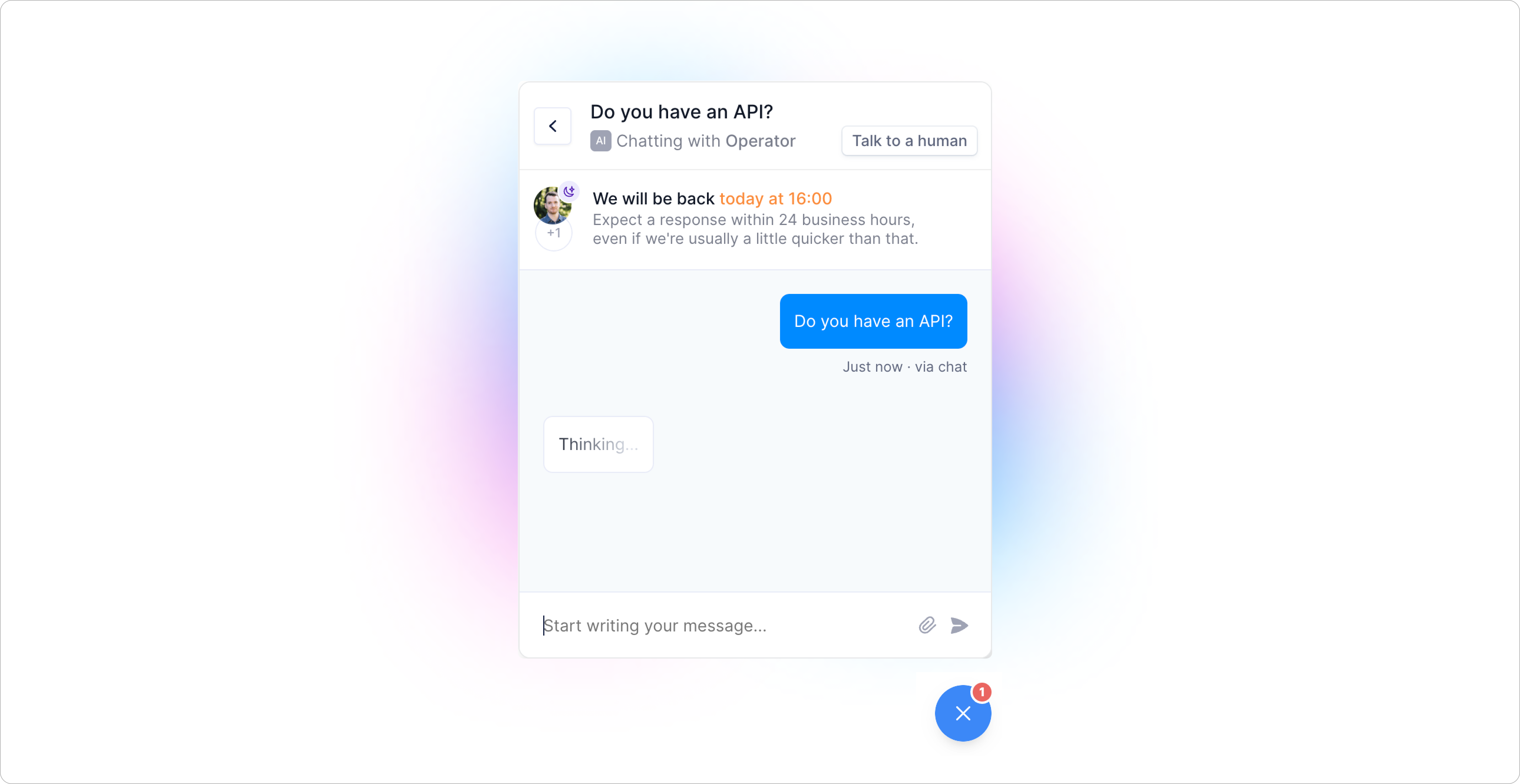
You can now add an AI-powered assistant to your embedded chat support widget. It responds in real time based on your training data, helping customers get quick answers to common questions without waiting.
Unlike many AI systems that wall users off behind automated flows, Fernand’s Chat Agent is designed to assist, not replace. There is always a visible, one-click path to talk to a real human. We call this the escape hatch — and we believe it’s essential.
The goal is to reduce friction for simple, repetitive requests while keeping your team in control. Customers get faster answers. You stay available for what actually needs your attention. We didn’t build AI to cut support out of the loop. We built it to make great support easier to deliver.
We’ve introduced a new Headless Contact Form feature that allows you to create custom forms connecting directly to your Fernand inbox.
A headless contact form is a completely unstyled form submission system that adapts perfectly to your design. Unlike traditional form widgets with preset styles, our headless form is a blank canvas – giving you 100% design flexibility to match your website’s exact look and feel.
Key features
Flexible form integration Create custom forms that connect directly to Fernand conversations without requiring our JavaScript widget
Multiple implementation methods Support for both HTML and JSON-based form submissions
Advanced customization options Support for custom form fields, attachments, conversation tagging, channel routing and user authentication.
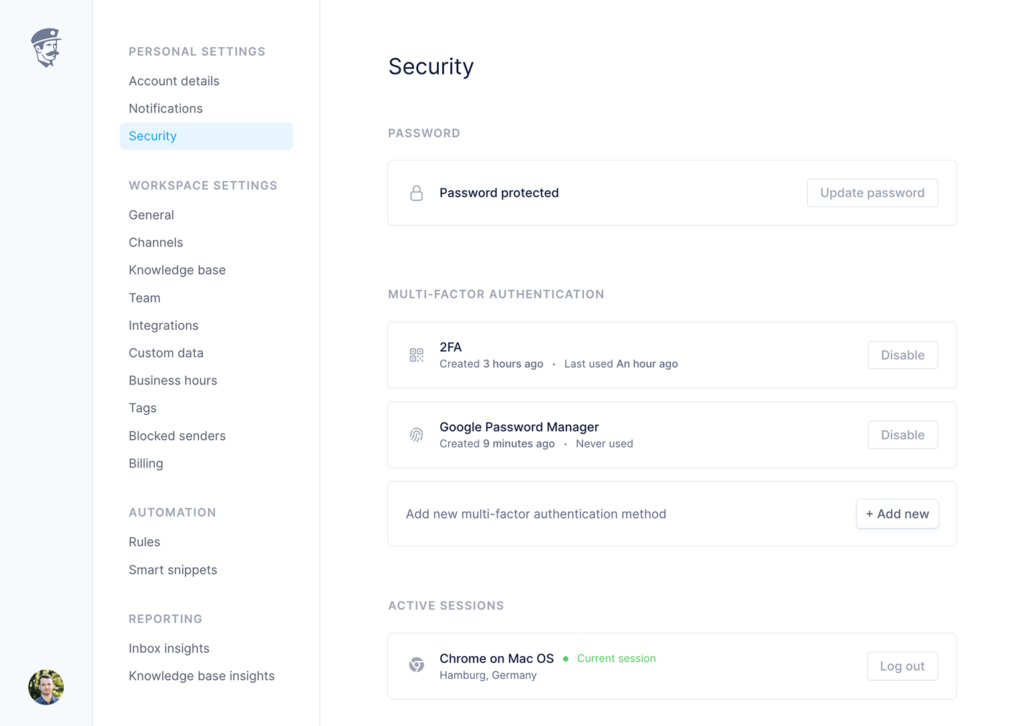
Fernand now offers Passkey authentication as a secure and convenient login option, alongside email and two-factor authentication (TOTP) via QR codes. Passkeys provide an additional security layer, making access faster and more secure. They’re compatible with all major browsers, mobile platforms, and popular password managers like 1Password.
You can set up Passkeys in your Security settings and register multiple devices for added flexibility. Passkey login is available for both browser and mobile app access.
We’ve also enhanced account security with real-time email notifications for new sessions, and other important security events. You’ll always have full visibility over your account activity, with active sessions clearly listed in your Security settings.
We’ve redesigned the entire Security page with a cleaner, more intuitive interface for an improved user experience.
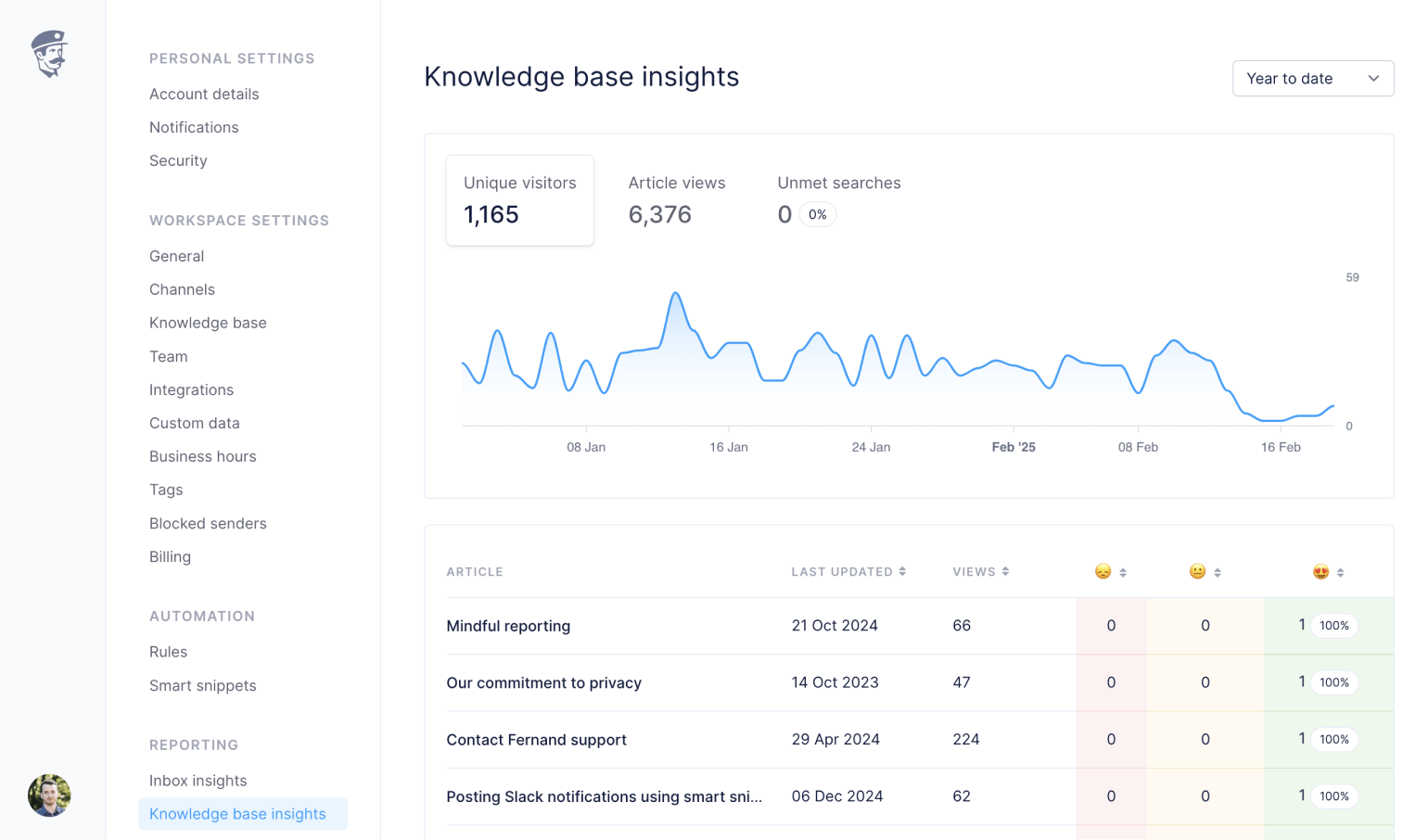
Introducing Knowledge Base Insights, a simple yet powerful way to monitor help article performance. Access by hitting G then R, your command palette ⌘+K or via the menu on the bottom left.
We’ve built knowledge-base insights with context in mind, not just raw numbers.
Unique visitors Track all unique visits coming to your knowledge base site
Article views See how many articles are viewed by users on average, and which articles are viewed most/least
Articles ratings Monitor individual article ratings, and improve your content strategy
Search insights Understand search volume, most searched and unmet search terms to fill knowledge gaps
With this release, we’ve also fixed and optimized 23 items
Code blocks are now sent with syntax highlighting to all email clients ✨
Better handling of shortcut tooltips for every action
Fixing a bug with sending images in the chat widget
Fixing an edge case with duplicate messages in the chat
Fixing a few regressions with our Paddle integration
We’re excited to unveil our latest feature that transforms how support teams collaborate and communicate: Shared drafts. This powerful new capability goes beyond traditional ticket management, giving support teams unprecedented flexibility and precision in crafting customer communications, especially for founders that are delegating their inbox to VAs or support agencies.
Shared drafts allows your team to:
Create collaborative draft responses that can be reviewed and refined before sending
Leverage AI-powered draft generation with customizable prompts
Set up automation rules to automatically trigger draft creation
Three game-changing use cases for B2B customer support:
Complex technical escalations Imagine a challenging technical support issue involving a complex integration. With Shared drafts, a support agent can create an initial draft explanation, then automatically route it to a senior engineer for technical review. The engineer can add clarifying technical details, and ensure the response is both accurate and customer-friendly before final approval.
Enterprise pricing approvals When handling high-value enterprise pricing requests, accuracy and authority are crucial. Support agents can create detailed draft responses outlining custom pricing packages, which are then automatically routed to founders or sales leaders for review. This ensures pricing offers align with company strategy while maintaining rapid response times. The AI can even generate multiple pricing tier options, giving you a range of pre-formatted offers to choose from.
Cross-language collaboration In global SaaS companies with multilingual support teams, Shared drafts becomes invaluable. An agent can draft a response in their native language, then route it to a colleague fluent in the customer’s language for translation and cultural nuance review. The AI draft generation can even provide initial translation suggestions, which you and your team can then refine.
Creating drafts automatically with Rules
Our automation engine allows you to create intelligent triggers for draft creation. For example:
Automatically create a draft for conversations that match specific keywords
Generate AI drafts for recurring issue types
Route drafts to specific team members based on ticket complexity or topic
AI-Powered draft generation
Customize your AI draft generation with specific prompts tailored to your support style, product, and customer communication guidelines. Match it with any trigger condition, and create multiple variations for you to pick from easily (e.g., you could use prompts like ‘Accept’, ‘Decline’, ‘Ask more information’, etc..)
We’ve also fixed several minor issues with this release:
Ability to edit notes
Better handling of websockets on the app and chat widget
Better UI for the Custom Data feature, now with component suggestions
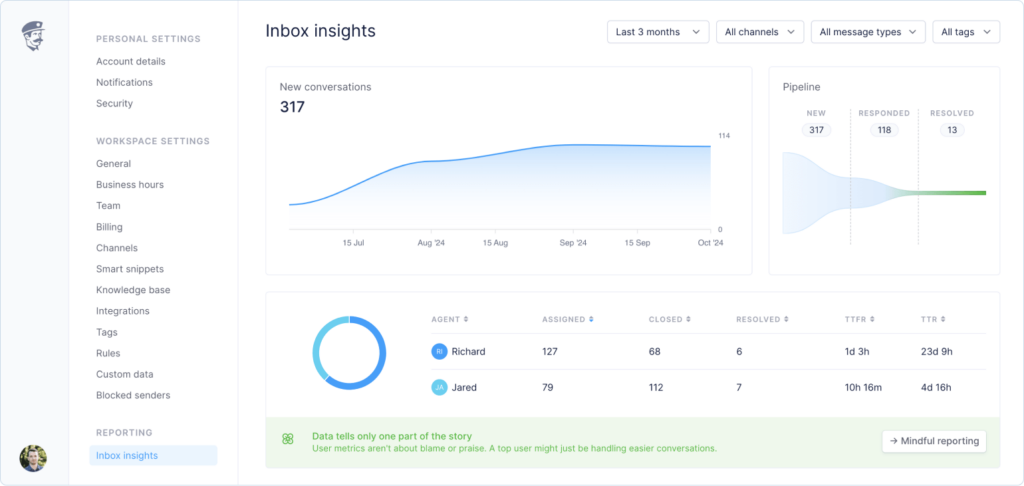
Introducing Inbox Insights, a simple yet powerful way to monitor your support performance you can access by hitting G then R, your command palette ⌘+K or via the menu on the bottom left.
We’ve built inbox insights with context in mind, not just raw numbers.
Conversation pipeline Track new, responded, and resolved conversations at a glance
Team activity See assigned conversations and closure rates for each team member
Smart filters Break down your data by time period, channels, message types, and tags
Response metrics Monitor median first response time and resolution time
Conversation status Clear breakdown of open, closed, and resolved conversations
Mindful reporting
Numbers never tell the whole story – that’s why we built Inbox Insights with context at its core. The dashboard reminds you that a top performer might simply be handling easier conversations, while someone with fewer resolved tickets could be tackling the most complex problems or mentoring new team members.
We’ve deliberately designed the interface to emphasize patterns and trends over individual metrics. Each data point comes with contextual information, helping your team understand the broader picture of your support operations. This approach fosters a culture of continuous improvement rather than competition, encouraging teams to learn and grow together.
Context is key to providing stellar customer support. Our custom data integration lets you connect any API endpoint to not only display but also send and update information right from your conversation sidebar — making customer interactions more informed, efficient, and actionable than ever.
Simply connect your API endpoint, add one or multiple headers (like an authorization token) and display your data using HTML and Liquid syntax, which also supports conditions and loops. No need to learn anything new or integrate with an obscure format you haven’t heard of.
Build a beautiful UI for your data in minutes
We know that creating great-looking displays for your custom data can be time-consuming. That’s why we’ve developed a comprehensive library of pre-built components that you can use right out of the box. Our component library includes:
Each component is designed to be both functional and visually appealing, ensuring that your custom data not only provides value but looks great, too, and doesn’t distract you from your main purpose: answering custom requests fast and efficiently.
Sending and updating data through interactive forms
Forms are the cornerstone of our two-way data functionality, enabling you to collect user input directly within conversations, update customer information in real time, and trigger actions in your external systems through a powerful implementation that offers seamless API integration, built-in validation, secure submissions with predefined headers, and flexible HTTP methods. More about interactive forms
Today, we’re introducing a powerful matching algorithm to our payment integrations that makes tracking customer relationships smarter than ever. Our system now automatically suggests related customers across Stripe, Paddle, and Lemon Squeezy — even when they contact you from different channels.
Always link customer metadata, no matter from which email they write you
No more manual linking or missing context. Whether your customer writes from their personal email, work account, or any other address, you’ll always have their complete payment history and subscription details at your fingertips. If our automated suggestion algorithm doesn’t catch the right match, you can still manually link them.
We’ve also fixed several minor issues with this release:
Better handling of edge cases for customers with multiple subscriptions
Reworked on the tooltip for agent and customer details
Added a 2FA indicator for admins to see their team status
Added the ability to mark conversation as resolved
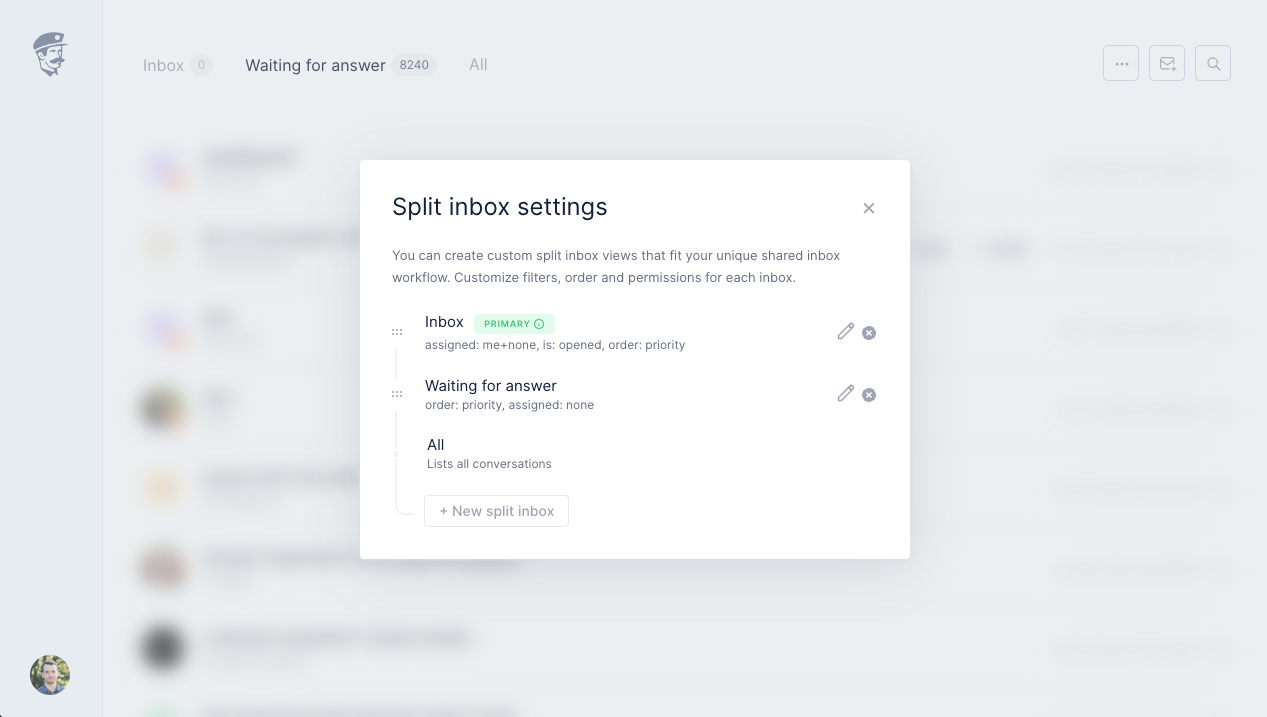
We’re excited to announce the launch of Split Inboxes, a powerful new feature designed to streamline your customer support operations. With split inboxes, you can now customize your workflow to match your team’s unique needs. Imagine prioritizing your VIP customers with a dedicated fast-lane inbox, effortlessly managing department-specific communications through separate channels, or seamlessly routing multilingual inquiries to the right team members.
Think of split inboxes as smart folders that automatically sort your incoming messages, helping you prioritize and focus on what matters most.
Increased efficiency Process similar requests together, reducing mental load and context switching.
Better prioritization Create splits for urgent issues, VIP customers, or specific product lines.
Team coordination Assign splits to different team members based on expertise, language knowledge, or workload.
Use cases examples
VIP Customer fast lane Create a split for your highest-value customers or those on enterprise plans. This ensures their inquiries are always visible and prioritized, leading to faster response times and enhanced satisfaction for your most important accounts. This works with Stripe, Paddle and Lemon Squeezy data as long as you turn on our native integrations with your payment provider.
Department-specific inboxes Set up separate splits for different email channels like sales@, hr@, and support@. This allows you to route inquiries directly to the appropriate teams. Team members can easily switch between these splits to manage their departmental communications efficiently.
Language-based routing Automatically separate conversations based on the incoming language. For instance, create a split for all French language inquiries and assign it to your French-speaking team members. This ensures that customers receive support in their preferred language, improving communication accuracy and customer satisfaction.
Our split inbox feature is filter-based. You can mix and match from a selection of 10 filters. Read our guide to learn how to set up and manage your inbox splits.
We’re continuing to invest heavily in our support widget experience. Based on real-life feedback from SaaS businesses using the widget in their environments, we’ve blasted dozens of bugs, optimized many elements, and generally improved the experience.
Translations
Hello, Bonjour, Hallo, Hola, Cześć, Ciao, Olá!
The widget strings now automatically adapt to your user’s locale and address them in their preferred language. We currently support English (default), French, German, Spanish, Polish, Italian, and Portuguese. If your language isn’t yet supported, just send us a quick note.
What’s even cooler is that you can specify language-specific dynamic prompts for every property where we allow this. For example, for your general orgDescription prompt:
Fernand('init', {
   appId: 'your-slug',
   orgDescription: {
      en: 'Hey! Do you need help?',
      fr: 'Salut! Besoin d\'aide?',
      de: 'Hallo! Brauchst du Hilfe?'
   }
})
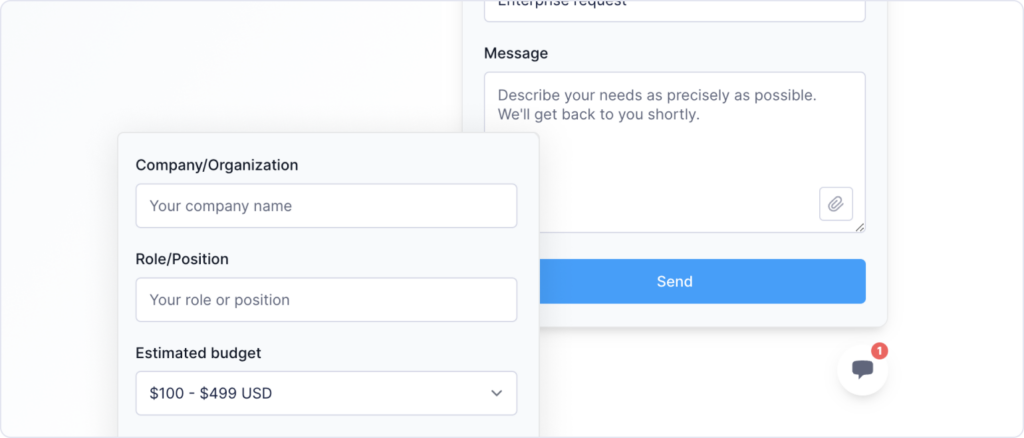
You can now create custom contact forms on your support widget. Just specify which fields you need, and it will create a custom view under your contact tab. The field data will then be passed in the message body.
Auto-tagging widget conversations
You can also attach tags to new conversations from the chat by passing the tags object in the init or set command. You can set separate tags for the chat or the contact form. Note that tags that don’t match your current tags settings will be ignored.
This is especially useful in combination with custom contact forms. You could for example create a custom form to handle Enterprise pricing request which you tag with “Enterprise” and use it to manipulate through Fernand Rules (assign to Sales rep, send to Webhook to create Slack notification…)
Accent color
We now support adding your brand color to further customize the widget launcher’s look and feel when opened.
accentColor — Changes the background color of the widget icon present on the page to better integrate with your design. This will also applies in the links inside the widget.
iconColor — Changes the message buble icon color that you see inside the widget launcher.
We’ve also fixed several minor issues with this release
Ability to pick your AI model through prompt settings (GPT-4, GPT-4o or GPT-3.5-Turbo)
Better support for invalid DKIM-signed emails
Favicon status indicator when you have new messages in your Inbox
New rule filter to indicate whether the conversation is a chat or email
Auto-complete contacts on email composition
A better way to navigate through the keyboard when using Linear extension
Custom avatar upload flow to replace Gravatar default
Today, we’re releasing one of Fernand’s most anticipated features: our in-app contextual support widget. We’ve dedicated a lot of energy to ensure that we provide the best additional communication channel with your customers.
We’re one of the only CS tools that support mixed message types: an authenticated customer can see the list of messages they previously exchanged with your company via email, then add a new reply in-app on the chat interface, and revert later to email. The list of messages persists on the Conversations view, which is the single portal where a customer sees all their requests and their status.
To set up your support widget, check the detailed setup guide we’ve prepared. It documents all the parameters and options you can use.
Seamless messaging experience
We’ve obsessed with making the messaging experience as pleasant as possible. Everything is fast, seamless, and to the point. We also support authenticating your logged-in users via a secret hash to make sure they don’t have to fill in the same boring info again and again and even persist in their session over time.
Custom links
We understand that your support widget should act as a wayfinder for users. We support adding any custom link to let you choose the actions that you want to push. You can also parameterize this on init depending on your user type. For example, point an unauthenticated user to request a demo on Cal.com while letting an authenticated user book a call with you directly.
We also support a wide variety of icons to enhance the look and scalability of your custom links.
Navigate help articles
Users can now navigate your entire knowledge base content without leaving your product. Everything works 1:1 as your public help site, including our multi-layered navigation and instant search results.
You can even specify deep links in your product that interact with the widget, e.g., ‘Open our DNS configuration guide’ redirecting to article:dns-configuration-guide and opening the widget in-app instead of redirecting users away. In fact, wanna try? Open our widget and Close it
Dark mode support
Our widget also supports dark mode natively through your user’s OS color scheme preference or via your custom prompt setting. It’s easy to pass the theme of the widget as a parameter either when initiating the widget or in flight if a theme setting has been toggled.
We’ve also fixed several minor issues with this release
Added a crowdsourced way to identify cold emails and spam messages
Added the ability to add a smart snippet directly from a conversation
Fixed a bug with multiple active sessions on our Security screening page
Fixed multiple dark mode inconsistencies on the app
Two-factor authentication is an additional security feature that requires a unique code to be entered in addition to your password each time you log in to Fernand. As usual, this comes with no paywall, no “Upgrade to activate 2FA”. Security shouldn’t be an upsell.
To activate two-factor authentication for your account, head over to Settings → Security and follow the steps to get started.
We’ve also fixed several minor issues with this release
Now possible to create Linear issues without a description
Attaching and unattaching Linear issues is now instantaneous
Bonjour → Start with urgent tickets now loops in your queue properly
Fixed the parsing of emails causing too many line breaks
Fixed an issue with Calendly invites email parsing
Added the ability to delete specific messages, or conversations
After months of refinement, we’re delighted to release our Linear integration to all users today. You can activate it by visiting Settings hit G then S → Integrations → Linear.
This integration enables a tight feedback loop between customer and product teams using Fernand for customer support. Use it to create Linear issues from customer conversations, link conversations to existing Linear issues, surface key information between tools, and make it easier to get back to customers when bugs are fixed or feedback has been implemented.
We meticulously replicated much of the native functionality of Linear when creating an issue, so that you can control the same level of details without ever leaving Fernand. We currently support selecting a team, adding a state, priority, assignees, labels, and project details.
We’ve also worked on a guide to explain how to connect to Linear, and make the best out of the integration.
We’ve just released our native integration for Paddle Billing. If you are using Paddle as a merchant of records or payment provider, you can now view subscriptions and payment history directly in the context of your customer conversation.
You can also use our smart automation rules and smart snippets to act based on the signals of your payment data. For example, you could build a priority support queue for users on a certain plan or auto-respond to free users, telling them it’ll take a bit longer.
We’ve also worked on a guide to explain how to retrieve your API key, connect everything, and make the best out of the integration.
We’ve also fixed several minor issues with this release
Custom system prompt as a setting for AI replies
Fixed Stripe plans showing ID instead of their names
Added OG images for each articles in the knowledge base
Better rendering for iframes on the knowledge base
Better handling of spam complaints
Custom HTML support in the knowledge base
Better monitoring of the email flow to ensure deliverability
Today, we’re proud to introduce Fernand’s knowledge base generator. It’s the fruit of months of hard work, where we obsessed over crafting the best experience to write SaaS help center articles.
Built with NuxtJS + Vercel. Super fast, so great for SEO
Notion-like editor you already know and love
Start with our opinionated template for SaaS
Compatible with Grammarly
Beautiful image backgrounds to enhance product visualizations
Resolution steps
Mobile friendly
Instant search in article context
Unlimited multi-level collections to organize your content to match user journeys
Light and dark mode support
Ability to customize branding with custom CSS + JS
This feature is included within our simple pricing scheme of $29/active user/mo. No article or collection limit; all features are included.
Data migration service
While we’re working on productizing our migration importers on a self-service basis, we’ve already worked on migration scripts for all the major providers in the industry. We perform concierge migrations free of charge for all paying users. Interested? Get in touch or book a demo.
Fernand now supports switching between workspaces natively. You can now click on your avatar on the bottom left of your dashboard, then “Switch workspace” to be able to toggle sessions between the multiple products you support. If you have multiple side projects and wish to maintain a clear distinction between them, this feature comes in handy.
Additionally, we now have the ability to detect the language of each incoming message automatically. When a message’s primary language is recognized as non-English, we’ll show a “Translate” button in context. Going even further, this is compatible with our smart automation rules, and you can set routes like “If this message is in German, assign it to this specific German-speaking agent“. No more separate support-de@piedpiper.com.
We’ve also fixed several issues and optimized several flows.
Corrected an issue with Amazon receipt emails not being rendered
We’ve just released our native integration for 🍋 Lemon Squeezy. If you are using Lemon Squeezy as a merchant of records or payment provider, you can now view subscriptions and payment history directly in the context of your customer conversation.
You can also use our smart automation rules and smart snippets to act based on the signals from your payment data. For example, you could build a priority support queue for users on a certain plan or auto-respond to free users, telling them that it’ll take longer.
We’ve also worked on a guide with our friends at Lemon Squeezy to explain how to connect and make the best out of the integration.
We’ve also fixed several issues and optimized several flows.
Corrected an issue with Amazon receipt emails not being rendered
You can now group mention colleagues using @everyone and @here in notes
It’s now possible to set granular permissions to specific users for almost every action that can be performed on Fernand. We’ve done this to give our users more flexibility regarding the kind of things they want to allow or not at different levels of collaboration, but also because it allowed us to push for something very exciting.
We believe that customer support should be a company-wide effort, so our new pricing model makes it easier for companies to adopt Fernand across the entire company.
As of now, only active users with permission to reply directly to customers are paying for a seat on Fernand! This means you can invite all your team members, including your entire engineering team, legal, security, marketing, sales, accounting, your office mascot dog or whoever else, so they can access the context of customer support tickets and collaborate internally on issues. They can access conversations, collaborate via notes, assign, tag, snooze, and much more — all of that, for free.
We’ve also fixed several issues and optimized flows.
Optimized rendering on iPhone for Safari users
Migrated our Super Replies to ChatGPT API for even better, more accurate generations
Added a shortcut to compose new emails, as well as a new action in our command palette
Rules, channels, and smart snippets are now sorted in alphabetical order
Enhanced the edge case of having an email hard-bounce in a conversation
Fernand web application is now responsive and scales for both tablets and smartphone screens. While most users access Fernand on their desktop, it’s common to respond quickly to a conversation on the go. The experience is much better now, but please note that this is an ongoing process, and we’ll improve the experience over time.
We’ve also fixed several issues and optimized flows.
Added the ability to Compose new emails and start conversations from scratch
Fixed a problem when an email bounced in a loop in multiple-recipients conversation
Refreshed our inbox zero imagery for even better “Woah” effects
Fixed a bug with our Snooze action in smart snippets
Fixed a bug where invoices wouldn’t load properly in the billing section
Improved the experience of pasting images in the editor
Customized the error message when OpenAI’s API is over capacity
Today, we’re introducing the most exciting feature so far for Fernand.
We’ve leveraged OpenAI‘s best-in-class API to bring our vision to life. We believe that AI can enhance processes and help automate mundane tasks while still keeping the user in charge of the final output. Hit SHIFT+R or click on the magic sparkles icon of Fernand’s editor. You’ll see an input field with a prompt to give further instructions to the AI, based on the content of your customer’s request. Some example prompts you could use:
“Decline politely”
“Interested”
“Will investigate”
“Escalated to engineers”
With just a small prompt like the ones above, the AI will be able to provide a fully-fledged, well-written email answer that retains the context of the initial message. This supports also multiple languages, including French, German, Spanish, Russian, Chinese, and many others.
We’ve also fixed several issues along with the release:
Better dark-mode handling of smart snippets
Dedicated “Open full view” item for the smart snippets in the command center
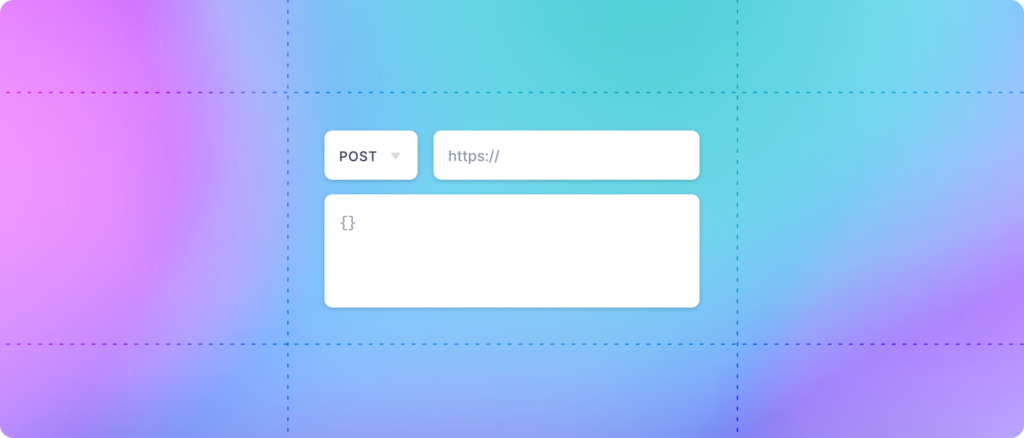
We pushed a major revamp of the Smart Snippets on production today. The most significant improvement is the introduction of the ability to send data using webhooks. You can use it to send a message, update a customer’s attributes in your CRM, or take just about any action on a customer that you’d want to do.
You can choose between different call types, including GET, POST, PUT, PATCH, and DELETE. You can also now specify up to 4 custom headers with a name/value pair.
We’ve also fixed several issues and optimized flows.
Ability to set a custom FROM name for automated emails and replies, including the use of variables like organization or agent name
Fixed an infinite loop in our Websocket implementation
Pasting an image in the editor now adapts automatically for high-density displays like Retina screens
Clearly labeled the “Open” status in the conversation sidebar for related tickets
Better UX of the DNS verification to avoid confusion due to propagation issues
Show / Hide the events in a conversation using CMD+E
We’ve been hard at work listening and implementing feedback from our first users. This update brings many experience improvements, new impactful features, and general bug fixes. We’ll list some of the highlights below.
A completely revamped emoji picker on the editor
Improved Markdown support on the editor
Better bounce handling of messages that couldn’t be delivered
Stripe integration is now fully functional, along with a few key changes to pull up Stripe customer data even when no subscription is active
“All” now lists all conversations, even those that are closed
Notification email to alert when a rule is executed successfully for the first time
Notification email to alert you when your channel DNS settings have been properly verified
Better UI for team member permissions
A delightful confetti animation when you reach 100% on the progress bar
Better UI for selecting multiple agents in the rules and smart snippets creator
Cross-browser optimizations, especially for Safari on Mac OS Ventura
92% of customer support reps experience anxiety daily. This has been the accepted norm for far too long. Today, we’re releasing Fernand, the calmest support experience ever made. Here’s everything we did to design an intentionally calm product.
We’ve done customer support ourselves for the past 10 years and experienced first-hand what a soul-crushing thing it can be. We set ourselves a rule: each flow should only show one thing at a time. No 5-column layouts, and no side panel with infinite scrolling. We do this to counter Hick’s law, which dictates that the more choices you have to make, the more time you’ll need to make a decision.
We’ve designed with psychological levers in mind to try to influence habit-forming, squash procrastination, and increase focus. For example, we communicate your progress throughout your session so that you feel a sense of completion toward a goal. Calm is predictability.
Visually, we made sure to use UI elements as sparingly as possible. We’ve used soft pastel background colors to bring a sense of depth while still feeling soft and invisible. Copy has also been crafted with calmness in mind: simple, honest, humane, and straight to the point.
Our pricing model is dead simple ($29/user/mo). One plan means no decision paralysis: it’s simple and predictable. Most importantly, it lets us include everything unlimited so you don’t have to worry about hitting a quota or how your bill will look at the end of the month.
We also make sure we’re monitoring our infrastructure and app uptime 24/7. No matter how well you’ve designed your product to be calming, everything can be destroyed in a split second. We know that nothing is more stressful than an outage, and we promise to make everything in our power to avoid incidents from occurring. We know that stuff inside out because we’re running an infrastructure-critical company as well.
We practice what we preach: our company itself is calm. We’re async first, remote first, and on a 4-day workweek schedule.